My HomeLab Setup in 2026
Since my last home-lab tour in 2023 my home-lab has evolved quite a bit, so going into 2026 I thought I’d document the current state. Here’s what it looks like:
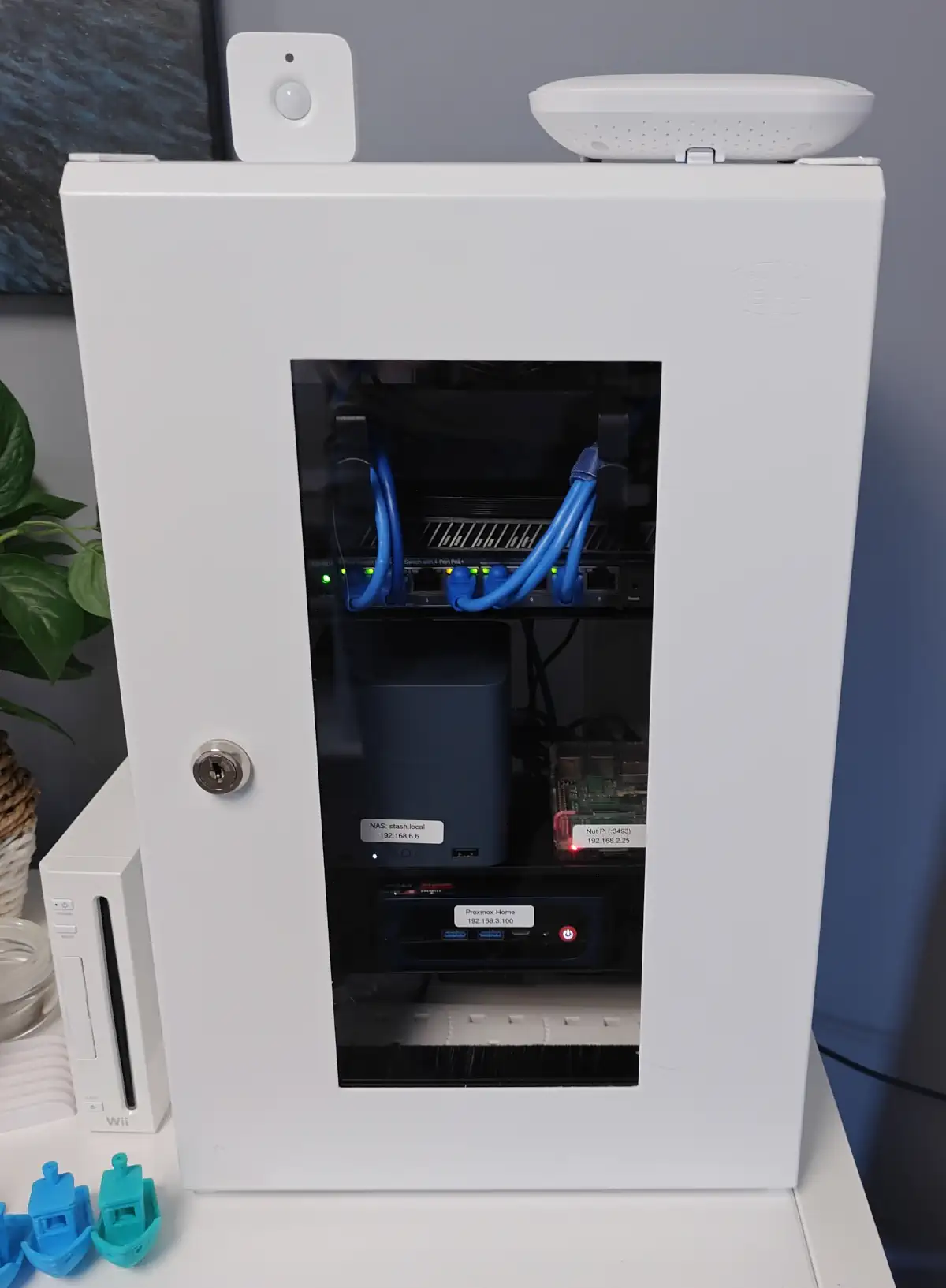
Last year I became aware that 10" mini server racks were a thing. While I think the more open-frame racks look cooler, I went for a more classic rack-style, with a door to be a bit neater overall and to help retain some noise since it sits close to where I work.
I do have a dual-fan mounted at the back of the case using a custom printed bracket, providing a little active cooling.
Here’s how the rack looks with the door-open:
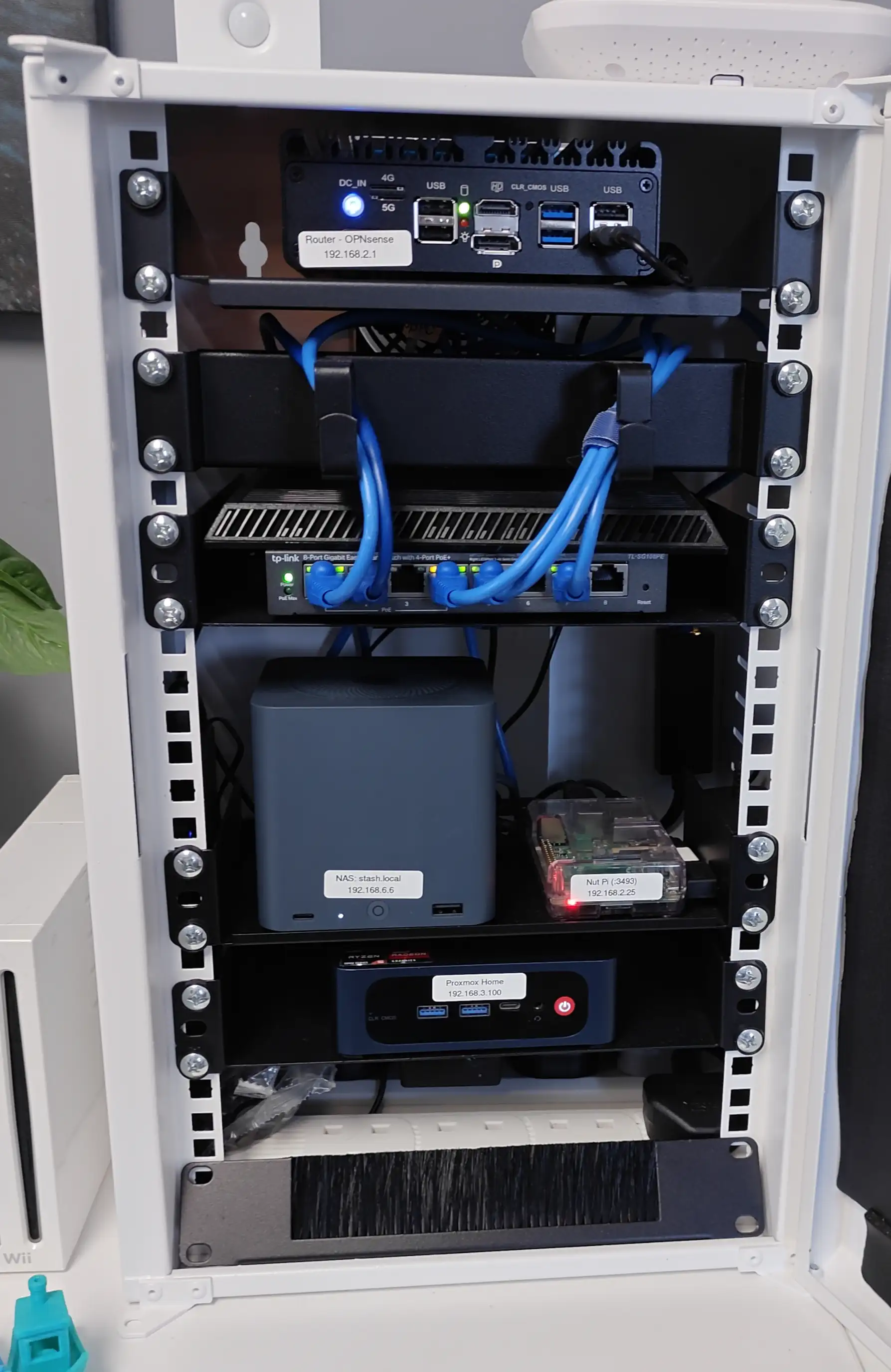
Going down the rack, the devices are:
Phillips Hue Sensor
Just a sensor connected to home-assistant to detect presence in my office which automates lights.
Zyxel NWA50AX PRO Wi-Fi Access Point
I got this as a reasonable budget home AP, which has the ability to speak with VLANs for separate networks, configurable via local-only management. Performs better than my prior router-combined access points, although sometimes I have odd issues with cheaper devices. Originally I had more significant issues due to being right next to my Zigbee antenna, leading to 2.4Ghz network interference. Moving them a bit apart helped a lot, but they’re probably still too close. I’ve been lazy about drilling holes and routing cables between rooms though!
Topton N100 MiniPC (OPNsense)
This is set-up to be my router running OPNsense, which it does the well. It’s beyond powerful enough for what I need with 4 cores and 8GB of RAM. It’s nice & silent since it’s a passively cooled device, with its case acting as a heat-sink of sorts. It has 4x 2.5GbE ports, one for WAN, one for general LAN, then the other two I’ve used as direct connections to my NAS and desktop, each on their own LANs, so transfers can run at 2.5Gbps instead of the 1Gbps of my switch.
ASUS Router/Modem
I have an old ASUS router, stuffed above my switch, set to act just as a VDSL modem for my WAN connection. Was really hoping to not need this after signing up for full fibre-to-the-home, but the install process has been problematic, mostly due to poor installer communication. The cable exists, just mere meters from my home. One day I’ll have full fibre!
TP-Link PoE Managed Switch
Does switching, and is managed to allow VLANs. I’ve enjoyed having POE, for direct powering of the AP and PIs. Its UI is clunky, but does the job. It’s just 1GbE though. I’d prefer to have more, but even just the jump to an equivalent 2.5GbE switch is an exponentially weaker value.
Beelink ME mini - NAS
At some point I got fed up with my Synology NAS box, mostly due to HDD noise and the limited bandwidth provided on a Synology unless you’re really spending a lot. I instead got this little NVME-SSD based PC, configured with 2x 2TB SSDs and installed TrueNAS on it.
It has a 4 core N150 CPU, with 12GB of (soldered) RAM. 2x 2.5GbE ports, 6x NVME slots, and an internal PSU. I’ve been super pleased with this box so far, it’s really well built and performs much better than my prior Synology box while being super quiet. I’d definitely recommend this to others who don’t need huge amounts of space where HDDs would be more suitable. I’ve only used 2 of the 6 SSD slots, so there’s plenty of room to expand. At $205 (without drives included) it seems really good value too. I promise I’m not sponsored for this, just very happy with the purchase.
Raspberry Pi 2 - NUT
I set up NUT on an old PI which acts as a central monitor for my UPS, which then communicates with the NAS and router, so they can smartly act upon power loss. I’m not sure I have everything configured properly, but things are connected and my devices know when the power is out.
Trigkey Mini PC - Proxmox
This Mini PC includes a Ryzen 5 5560 (6C/12T, Up to 4.0GHz), with 16G of RAM.
This little power-house runs Proxmox, which then houses a variety of self-hosted applications and test systems. Apps include: HomeAssistant, Uptime Kuma, Grafana, BookStack, danb/rss, forgejo, forgejo-runner, peertube-runner and ArchiveBox. This was a nice upgrade on the old NUC I used before, which is now my workbench PC. The hardware quality, especially when it comes to fit and finish, is clearly a step below my old NUC, but it’s clearly been built for value and it works fine so no major complaints.
A SONOFF Zigbee USB gateway connects to this, and is passed through to the HomeAssistant VM so that smart devices can connect to it. I keep to Zigbee only, to avoid having more sketchy devices on my home network which would need locking down. I used to use a Phillips Hue Bridge up until Hue changed their app & terms to require account login, under false reasoning of security.
Power
Stuffed at the bottom are some power strips so that all devices can plug-in within the rack itself. There are various device power supplies there also, either in the bottom or tape-mounted to the sides of the rack.
The power strips receive their magic pixies from a UPS, the APC Back-UPS Pro 550. This does its job well, and has helpfully kept my network up during some power-cuts which is nice. It did loose capacity at some point though, which I found out during a power-cut when it only lasted a couple of minutes. It’s been fine though since replacing the battery, and I now have a monthly task to cut its power and check the capacity.